
What can you automate with Make?
A Make scenario is three things: something that happens, a rule that checks it, and an action that follows. Once you see it that way, most of the manual work in a small team turns out to fit the pattern. Here are ten scenarios we build most often, what triggers each one, and what it removes from someone's week.
01What a scenario actually is
Make connects more than 2,000 apps and runs your logic between them. A scenario starts with a trigger: a form is submitted, a status changes, a date passes, an email arrives. Then it filters, because most of the value is in the checks nobody remembers to do by hand. Then it acts: create, send, update, notify, across every tool involved.
The mental model is worth holding on to. Your work tool is the surface your team looks at. Make is the machinery underneath. We wrote that split up properly in monday.com and Make: the automation stack.
02The ten scenarios we build most
Trigger: an invoice passes its due date. Make checks the payment has not landed, then sends a reminder written in your tone, escalating on a schedule you set. Full playbook in automated invoice reminders.
Trigger: a deal is marked won. The folder is created, the kickoff document is drafted from your template, the welcome email goes out and the checklist appears on the board. Eleven steps become none.
Trigger: a record changes anywhere. Make pushes it to the CRM, the board and the accounting tool, so nobody types the same address three times. This is the cure for the most underestimated cost in small teams.
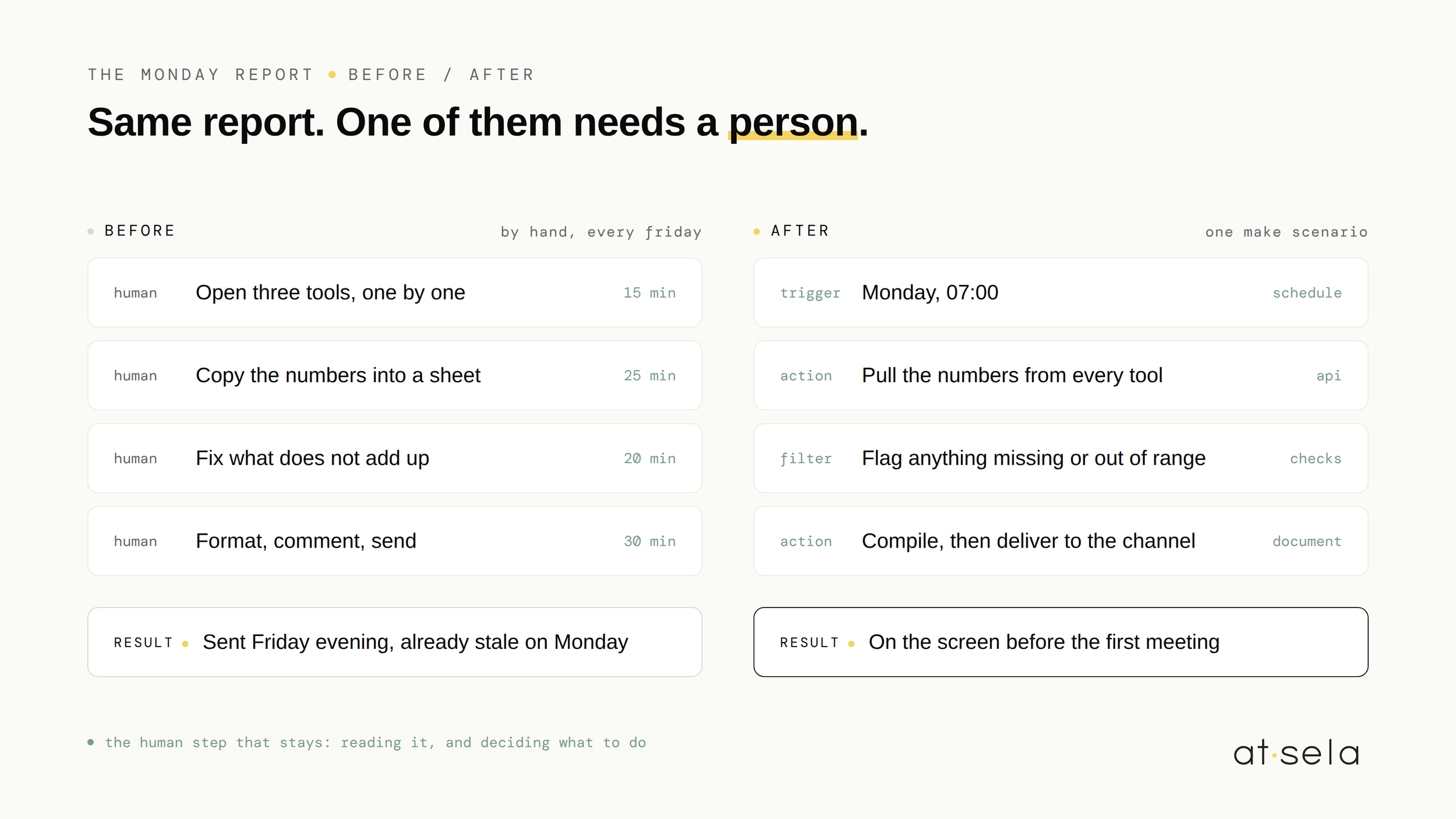
Trigger: a schedule, every Monday at 7:00. Numbers are pulled from your tools, compiled into one document and delivered before the first meeting. No one assembles anything by hand on a Friday afternoon.
Trigger: a request arrives. AI drafts from your templates and your pricing rules, a human reviews and sends. The draft is the machine's job, the decision stays yours.
Trigger: a message lands in the shared inbox. It is classified, tagged by urgency, routed to the right person, and the easy ones get a drafted reply waiting for approval.
Trigger: someone submits your intake form. A properly structured item appears on the board with the owner, the deadline and the attachments already in place, instead of a notification someone has to transcribe.
Trigger: a contract has been sitting unsigned. Make checks the e-signature status, nudges the client, tells the owner when it is signed, and files the executed copy where it belongs.
Trigger: a receipt is photographed or forwarded. The amount, date and supplier are extracted, checked against your categories, and pushed into the accounting tool. Month end stops being an archaeology project.
Trigger: a deal has gone quiet for a number of days you choose. Make checks nothing has moved, then reminds the owner or sends the follow-up. Pipelines leak from silence more than from rejection.
03Which one to build first
Not the most impressive one. The one that costs you the most this year, that follows the same rules every time, and that fails quietly if it breaks. Those three conditions together are what makes a first build safe.
If you do not know which that is, spend ten minutes finding out with the automation self-audit. Teams almost always start with the task that irritates them, and the numbers almost always point somewhere else.
04When Make is the wrong answer
- Your tool already does it. If the whole workflow lives inside one app and that app has a native automation for it, use the native one. A second system to maintain buys you nothing.
- The volume is tiny. A scenario that runs twice a month rarely earns back its own maintenance. Write the checklist instead.
- The logic is genuinely complex. Past a certain depth of branching, a scenario becomes harder to read than the code it replaced. At that point we write the code, and say so.
- The process is still moving. Automating a workflow that changes every month means rebuilding it every month. Stabilize first.
We would rather talk you out of a build on a free call than deliver something you quietly stop using.
05How we build them
Every scenario we ship follows the same method: we listen to how the work actually happens today, design the smallest version that solves it, build in weekly iterations you can see, and hand it off documented. The Make account is in your name, the scenarios are named and commented so your team can read them, and nothing depends on us being reachable. You own what we build.
That is the whole approach, and there is more of it on our services page. A method, not a magic trick.
Common questions, honest answers.
What can you automate with Make +
Anything that follows a repeatable rule across more than one tool: invoice reminders, client onboarding, keeping a CRM and an accounting tool in sync, weekly reports, proposal drafts, support triage, intake forms, signature chasing, receipt capture and quiet-deal follow-ups. If you can describe the task as "when this happens, check that, then do this", it fits.
Do you need to know how to code to use Make +
No. Make is visual, and a simple scenario is genuinely buildable by a careful non-developer. What changes with experience is not the building, it is the error handling: what happens when an API is down, when a field is empty, when the same event fires twice. That is where scenarios quietly break, and where knowing how to write code stops being optional.
How many scenarios does a small team actually need +
Fewer than most people expect. Three or four well built scenarios usually cover the bulk of a growing team's repetitive work. Long lists of small automations tend to be a symptom: they are cheaper to build than to maintain, and nobody remembers what half of them do six months later.
Curious if we can help
Book your free 30-minute AI scan. We'll map where your team actually loses time, and tell you honestly what's worth automating. And what isn't.
FREE AI SCAN