
How do you know which tasks to automate?
You do not need anyone's help to find your first automation. You need ten minutes, a blank page and four questions. List every task your team repeats, put a number next to each one, and sort by what it costs you in a year. The top three are your answer. This is the same first pass we run on a free scan call, without the call.
01Rank by cost, not by irritation
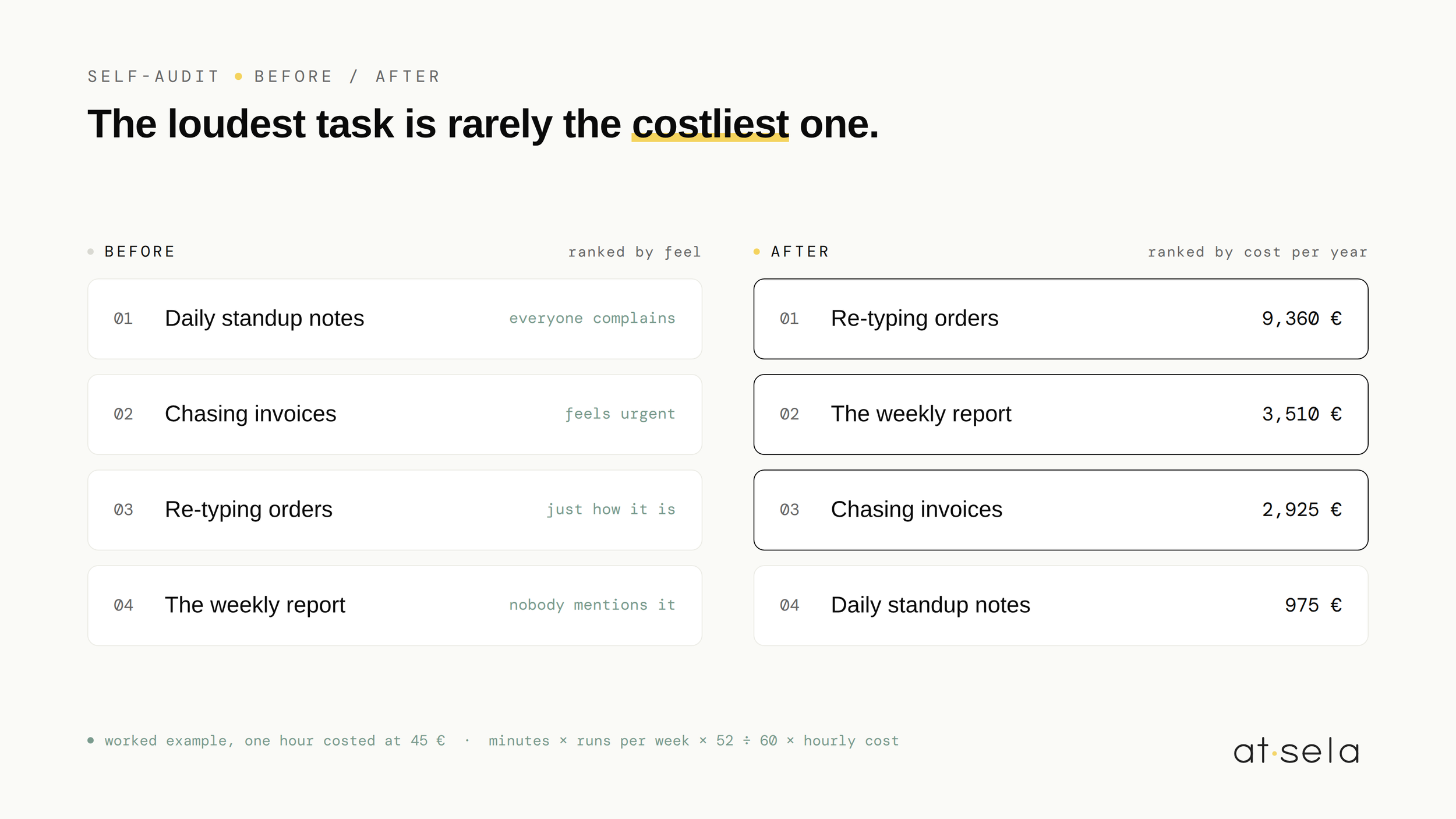
Most teams already know what annoys them. That is not the same as knowing what is expensive. The loudest task is rarely the costliest one, because irritation scales with how unpleasant a job feels, not with how many hours it eats.
An example worth doing on your own numbers. A five minute task that everyone complains about, done once a day, costs about 25 minutes a week. A quiet weekly report that nobody mentions, because it has always been done on Friday afternoon, costs 90 minutes. The report is three times more expensive and it never comes up in meetings.
So the self-audit has one rule: every task gets a number before it gets an opinion.
02The four questions
For each recurring task, answer these. Rough figures are fine, you are ranking, not accounting.
The first three give you a price. The fourth tells you whether that price is recoverable.
A 20 minute task, five times a week, done by someone whose hour costs 45 euros, works out to about 87 hours and 3,900 euros a year. One task.
03The ten minutes, timed
Do it alone if you must, but it works better with two people from different roles. The person who does the task and the person who pays for it rarely give the same number, and the gap between them is usually where the real waste is.
04What the list usually says
After enough of these, the same names keep surfacing at the top:
- Chasing unpaid invoices, because it is emotional work nobody schedules. The playbook is in automated invoice reminders.
- Re-typing the same information from one tool into another, which is almost always underestimated. We put actual numbers on it in what re-typing data really costs.
- The weekly report, assembled by hand from three tools every Monday morning.
- Writing quotes and proposals from templates that live in someone's inbox.
- Onboarding a new client, the same eleven steps, every time, from memory.
In a 2025 project with a twelve person engineering firm, that top line was quote preparation: 40 minutes each. After the build, 4 minutes. Quotes going out within 24 hours rose by 31 percent, and nothing was re-typed. The firm knew quotes were slow. What the exercise showed was how much slow was costing.
05Three that should stay manual
- The rules change every time. Automate an unstable process and you will rebuild it monthly. Stabilize first, automate second.
- It saves less than an hour a week. Below that line, an automation rarely pays for its own maintenance. A checklist is cheaper and it never breaks at 2am.
- Judgment is the work. If the value of the task is the thinking, automating around it just moves the thinking somewhere less visible.
We would rather tell you this on a free call than build you a system you did not need. Being honest about scope is the whole job.
06What to do with your top three
Take the list somewhere. Build one yourself if you have the appetite, hand it to whoever owns your tools, or bring it to a call. If you want to arrive prepared, how to prepare for an automation audit covers what to gather. And if that sounds like homework, skip it: the free scan needs no preparation at all, your top three is more than enough.
What happens next is the part people expect to be mysterious and never is. We listen to how the work actually happens, design the smallest system that solves it, build in weekly iterations, and hand it over documented, in your accounts, readable by your team. A method, not a magic trick. You can see the shape of the work on our services page.
Common questions, honest answers.
How do you decide what to automate first +
Price every repeating task with that formula, drop anything whose rules change from one run to the next, then sort by yearly cost and take the top three. Ranking by annual cost rather than by how annoying a task feels changes the order more often than people expect.
What is an automation self-audit +
A short exercise you run yourself, before involving anyone: list the tasks your team repeats, note how long each takes and how often it runs, multiply out the yearly cost, and rank. It takes about ten minutes and it gives you a shortlist you can act on, quote against, or ignore with good reason.
Is a self-audit enough, or do you still need a real audit +
A self-audit tells you where the money goes. It will not tell you how the system should be built, what breaks when a tool changes, or what the work costs to deliver. That is what the free 30-minute scan starts, and what a paid audit finishes: your workflows documented, a recommended design, and a fixed quote to implement it.
Curious if we can help
Book your free 30-minute AI scan. We'll map where your team actually loses time, and tell you honestly what's worth automating. And what isn't.
FREE AI SCAN