
AI reads the incoming message, works out what it is about and how urgent it is, sends it to the right person, and drafts a reply for the easy ones. A human still approves before anything leaves. The model reads and proposes. Your rules decide what happens next.
That distinction is the whole subject. Support triage is one of the few places where AI is genuinely excellent, and also one of the few where letting it act alone will cost you a client.
01The expensive part is not answering, it is sorting
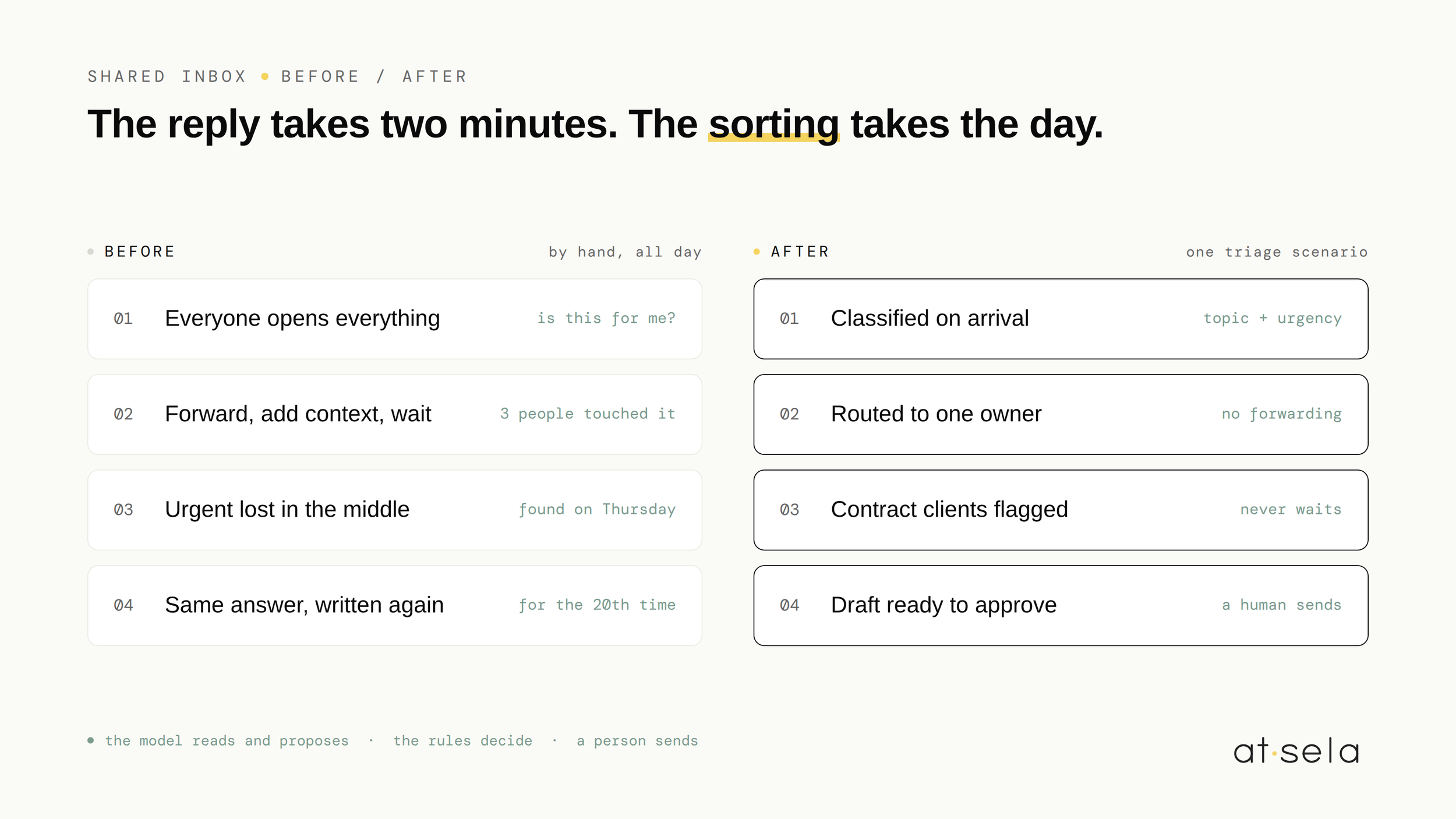
Ask a team where support time goes and they will say "answering customers". Watch the work and you see something else. Someone opens the shared inbox, reads a message that is not for them, decides it is for someone else, forwards it, adds a sentence of context, goes back to what they were doing, and loses the thread of it.
The reply itself is often two minutes. The sorting, the forwarding and the interruption around it are the cost. And it is a cost that grows with the team rather than with the volume, because every additional person is one more inbox to check and one more person who might already have answered.
02What AI is genuinely good at here
Support messages are unstructured text written by people who are annoyed, in a hurry, or both. That is exactly the material language models handle well, and exactly the material that rules alone handle badly. A keyword filter cannot tell the difference between "my order has not arrived" and "I would like to order more".
Four jobs, and all four are reading jobs. None of them is a decision.
03What it must never do
This is the part that gets skipped, and it is the part that matters.
- Send a reply to a customer without a human approving it
- Promise a refund, a delivery date, a discount or a credit
- Close a request, or decide that something does not need an answer
- Decide priority alone when money or a contract is involved
- Write to a client who is already unhappy about an earlier automated message
The reasoning is not caution for its own sake. A rule can be explained. If a request was routed to accounting because it contained an invoice number, you can say so, and you can change it. A model's judgment on a Tuesday cannot be explained the same way, and cannot be relied on to be identical on Wednesday. Anything a customer will hold you to has to sit behind a rule or a person.
04How the build actually works
A message arrives in the shared inbox. An automation picks it up, sends the text to a model with your categories and your definition of urgent, and gets back a classification. Your rules take over from there: this category goes to this person, this level of urgency raises a flag in the channel, this sender is a client under contract so it never waits.
For the questions that repeat, a draft reply is prepared and left waiting for approval. The person opens it, reads, sends or rewrites. Over a few weeks you learn which categories are drafted well enough to approve in one click, and which ones should never be drafted at all.
Nothing here is exotic. It is the same three-part shape as any other scenario we build, which we described in ten Make scenarios for small businesses: something happens, checks run, actions follow.
05When you should not build this
- One person handles everything. If there is no routing decision to make, triage automates nothing. The cost you are feeling is volume, and that is a different problem.
- Under roughly twenty messages a week. Reading them yourself is faster than describing your categories precisely enough for a machine.
- Your categories do not exist yet. If nobody can say what the five types of request are, no model will work it out for you. That conversation is the real first step, and it takes an hour.
- The inbox is a symptom. Sometimes the flood comes from an unclear invoice, a confusing checkout or a missing status page. Automating the triage of a problem you could remove is expensive theatre.
If you want to know which of your repeating tasks is actually worth the build, the arithmetic takes ten minutes and we wrote it out in the 10-minute self-audit.
06What you end up owning
A set of categories that belong to you and that you can change in a sentence. Routing rules your team can read. Draft replies in your own tone, that a person still sends. And a support inbox where the first question is no longer "is this for me".
Accounts in your name, scenarios named and commented, documentation on handover. A method, not a magic trick. The rest of how we work is on our services page.
Common questions, honest answers.
How does AI triage support requests +
It reads the incoming message, classifies it by topic, ranks it against your definition of urgent, extracts details like an order number, and routes it to the right person. For questions that repeat, it prepares a draft reply. A human approves before anything is sent.
Can AI answer customers on its own +
It can, and we advise against it. Anything a customer will hold you to, a refund, a delivery date, a discount, has to sit behind a rule or a person. A rule can be explained and changed. A model's judgment cannot be explained the same way, and will not be identical next week. Let it draft, let your rules decide.
How many support messages justify automating triage +
Roughly twenty a week, and more than one person doing the sorting. Below that, reading them yourself is faster than describing your categories precisely enough for a machine. Triage automates the routing decision, so if there is no routing decision to make, it saves nothing.
Curious if we can help
Book your free 30-minute AI scan. We'll map where your team actually loses time, and tell you honestly what's worth automating. And what isn't.
FREE AI SCAN