
An automated invoice reminder is a message that sends itself when an invoice passes its due date, checks whether the payment has arrived first, and escalates politely if it has not. You write the sequence once, connect it to your invoicing tool, and stop spending Friday afternoons chasing money you have already earned.
01The polite chase nobody enjoys
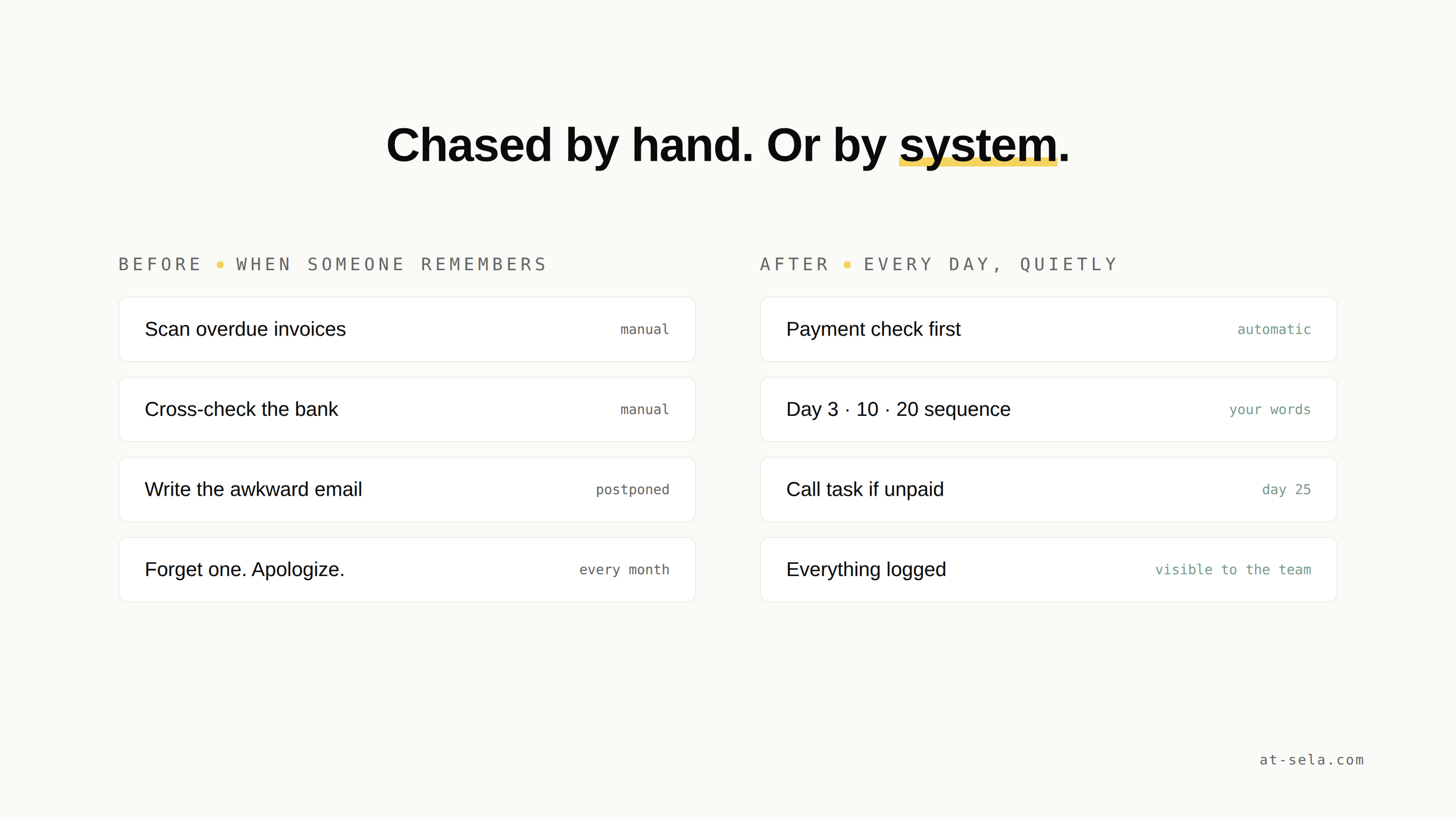
Every small team knows the ritual. Someone opens the invoicing tool, scans for overdue payments, cross-checks the bank account, then writes the same careful email for the fourth time this month: friendly, slightly apologetic, "just following up on invoice 2043".
It is unpleasant work, so it gets postponed. And every week of postponing costs real money: the older an invoice gets, the harder it becomes to collect. Meanwhile the mental load stays on one person, usually the founder or the office manager, who carries a list of awkward conversations in their head all week.
The task is repetitive, rule-based and uncomfortable. That combination makes it one of the best automation candidates a small business has: the rules are simple, the volume is steady, and nobody will miss doing it by hand.
02What "automated" actually means
A reminder system is three rules connected together, nothing more:
- A trigger: the invoice due date passes in your invoicing tool
- A check: has the payment arrived? If yes, do nothing. This check is what separates a system from a spam machine.
- A sequence: escalating messages, each one written by you, in your tone, sent on your schedule
Most invoicing tools have basic reminders built in. They break down when your reality is more specific: payments landing in a bank account the tool does not see, invoices tracked in monday.com, or clients who need different treatment. That is where a scenario in Make connects the pieces: it reads the invoicing tool, checks the payment status, and runs the sequence with your rules.
03The escalation ladder that works
The sequence matters more than the technology. This ladder is the one we see work for service businesses:
Two details make the ladder feel human. The tone escalates in firmness, never in emotion. And the last step is deliberately not an email: some conversations belong on the phone, and the system's job is simply to make sure that call happens.
04What it changes for your cash flow
Run your own numbers. Count the invoices that went past due last quarter, and how many days late they were paid on average. Every one of those days is cash you financed for your client, plus the minutes someone spent noticing, checking and writing.
The reminder system does not make clients richer. It removes the two things that actually delay payment: the invoice they honestly forgot, and the follow-up you postponed because it was awkward. Most late payments are not disputes. They are drift, and drift responds very well to consistency.
A reminder that always arrives on day 3 teaches your clients something quietly useful: your invoices do not slip through cracks. That reputation compounds. The second month of a working sequence is usually calmer than the first, because clients adjust to the rhythm before the reminders even go out.
05When you should not automate this
Honesty about scope, as always. Keep the manual follow-up when:
- you send a handful of invoices a month: a calendar reminder costs less than a system
- one client is most of your revenue: that relationship deserves a personal message, not a sequence
- your invoicing data is messy: automating on top of wrong due dates sends wrong reminders faster. Fix the data first.
The last point is the one we insist on. If your invoice data lives in three places that disagree, start with the re-typing problem before you automate anything downstream of it.
06How we build it
A typical build connects your invoicing tool, your bank feed or payment processor, and your project board. A Make scenario checks due dates daily, verifies payments before any message goes out, sends the sequence from your own email address, and logs every step where your team can see it. Templates stay in your words. Stop conditions are explicit: payment received, dispute opened, or a human takes over.
It is a method, not a magic trick: we listen to how your follow-up actually works, design the ladder with you, build it, and hand it off documented. You own what we build. See how we work for the full picture.
Common questions, honest answers.
How do you automate invoice reminders +
Start with your invoicing tool's built-in reminders if they cover your case. When payments or invoices live in several tools, connect them with an automation platform like Make: a daily scenario checks due dates, verifies the payment has not arrived, then sends an escalating sequence written in your own words.
Do automated payment reminders damage client relationships +
Not if the system checks payments before sending, escalates in firmness rather than emotion, and hands sensitive cases to a human. Consistent, polite reminders usually improve relationships: clients learn your invoices never slip, and awkward surprise escalations disappear.
How many payment reminders should you send +
Three emails is the practical ceiling: a friendly nudge around day 3, a firm reminder around day 10, and a final notice around day 20. After that, the system should create a task for a phone call. More emails past that point train clients to ignore them.
Curious if we can help
Book your free 30-minute AI scan. We'll map where your team actually loses time, and tell you honestly what's worth automating. And what isn't.
FREE AI SCAN