
monday.com is where your team sees its work. Make is where the work runs on its own. Connect the two and you cover most of what a growing team needs to automate: boards that stay current, documents that write themselves, reminders that leave on time. This is the stack we build on most often, and this is how the pieces actually fit.
01Two tools, two different jobs
monday.com is a work OS: boards, statuses, owners, deadlines. Its job is to be the one place where everyone sees what is happening, without asking. Make is an automation platform: it watches for events, applies your rules, and moves data between more than 2,000 apps. Its job is to do the work nobody should be doing by hand.
The confusion starts because each tool promises a little of the other. monday.com ships its own automations, and Make can technically store data. Both work, until the day they don't. The pattern that holds over time is simple: monday.com is the surface, Make is the machinery. Keep your team on the surface, keep the logic in the machinery, and each tool spends its life doing what it is best at.
02The three layers of the stack
Almost every system we ship has the same three layers:
A Make scenario triggers on an event (a status change, a form submission, a due date passing), checks your conditions, then acts across email, spreadsheets, CRM, accounting or e-signature. When text is involved, an AI step drafts: a document from your template, clean data out of a messy email, a tag on a support request. The AI never decides alone. It drafts, and your rules decide.
Layers keep the system honest. When something breaks, you know exactly where to look. When a tool changes, you replace one layer, not the whole machine.
03The five builds we ship most
Whatever the industry, the same requests come back:
- Invoice follow-up: Make watches due dates, checks the payment arrived, then sends reminders written in your tone. The full playbook is in automated invoice reminders.
- One entry, everywhere: a client signs, and the board, the CRM and the accounting tool all know it. This is the cure for the re-typing problem.
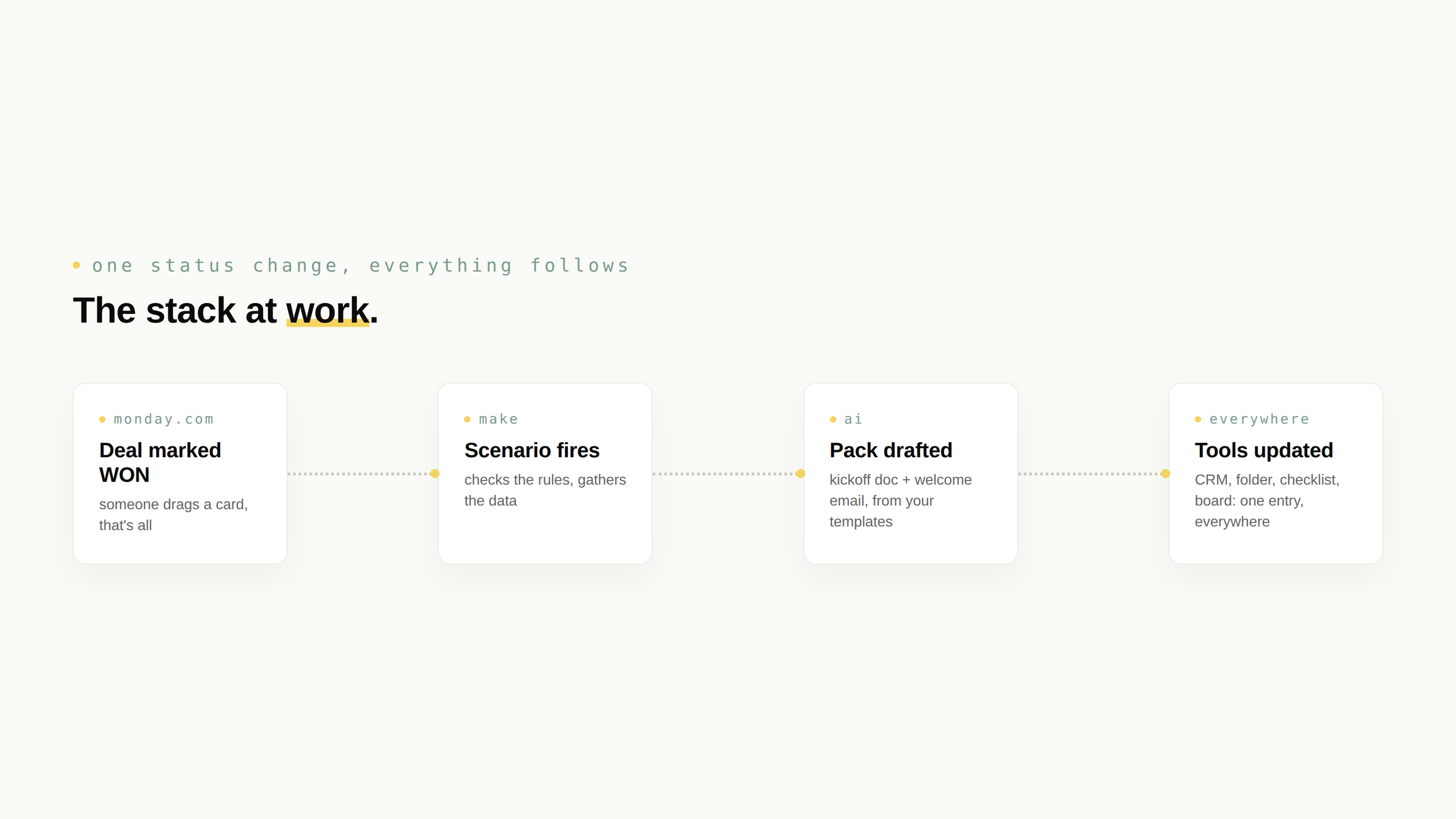
- Client onboarding: one status change generates the folder, the kickoff doc, the welcome email and the checklist, in the hour.
- The weekly report: numbers pulled from your tools every Monday at 7:00, compiled and delivered before coffee.
- Quotes and proposals: a request comes in, AI drafts from your templates, a human reviews, it goes out the same day.
04When monday.com automations are enough
Honesty about scope, as always: monday.com's native automations are good, and if your workflow starts and ends inside monday.com, use them. "When status changes to Done, notify the owner" does not need Make, and adding Make to that job would just be a second thing to maintain.
You reach for Make when the workflow crosses tool boundaries or needs real logic: several conditions in a row, a lookup in another system, error handling, a payment check before an email goes out, an AI step in the middle. A rule of thumb that serves well: one tool and one rule, native automation. Several tools or several rules, one Make scenario. Worth knowing too: native automations count against your plan's monthly actions, which tends to surprise teams as volume grows.
05When this stack is the wrong answer
- Your team lives elsewhere: the best stack is the one attached to where work already happens. The logic layer stays, the surface changes.
- Volume is tiny: an automation that runs twice a month rarely pays for its own maintenance. A checklist is cheaper.
- The process itself is unstable: automate a process that changes weekly and you will rebuild the scenario weekly. Stabilize first, automate second.
We would rather tell you this on a free call than bill you for a system you did not need.
06How we build it
Our builds follow the same method every time, a method, not a magic trick: we listen to how your team actually works, design the smallest system that solves the problem, build it in weekly iterations, and hand it off documented. Accounts in your name, scenarios your team can read, zero black boxes. You own what we build.
If you want to see whether your workflows fit this stack, how to prepare for an automation audit is the natural next read. Or skip the homework entirely: the first call needs no preparation at all.
Common questions, honest answers.
Does monday.com integrate with Make +
Yes, natively. Make has a dedicated monday.com app: scenarios can watch board events (new item, status change, column update), create and update items, and read any column. The connection takes minutes, and from there monday.com can trigger workflows in any of the 2,000+ apps Make connects to.
Should you use monday.com automations or Make +
Both, for different jobs. If the workflow starts and ends inside monday.com, native automations are simpler and enough. Reach for Make when the workflow crosses tools or needs logic: several conditions, lookups in other systems, error handling, or an AI step. One tool and one rule: native. Several tools or several rules: Make.
Do you need to code to connect monday.com and Make +
No. Make scenarios are built visually, and the monday.com connection is a few clicks. Code earns its place at the edges: custom API calls, data transformations, or systems without a native connector. That is exactly where a real data and engineering background makes the difference between a workaround and a clean build.
Curious if we can help
Book your free 30-minute AI scan. We'll map where your team actually loses time, and tell you honestly what's worth automating. And what isn't.
FREE AI SCAN