
When a deal is marked won in the CRM, the client and the invoice draft appear on the accounting side, already filled, and the payment status comes back to the CRM once the money lands. That is the whole integration. What it does not do, and must never do, is decide which system is right when the two disagree about the same client.
This is one of the most requested connections and one of the most often botched, because the interesting question is not technical. It is deciding, before writing anything, which system owns which piece of information.
01The moment the same client exists twice
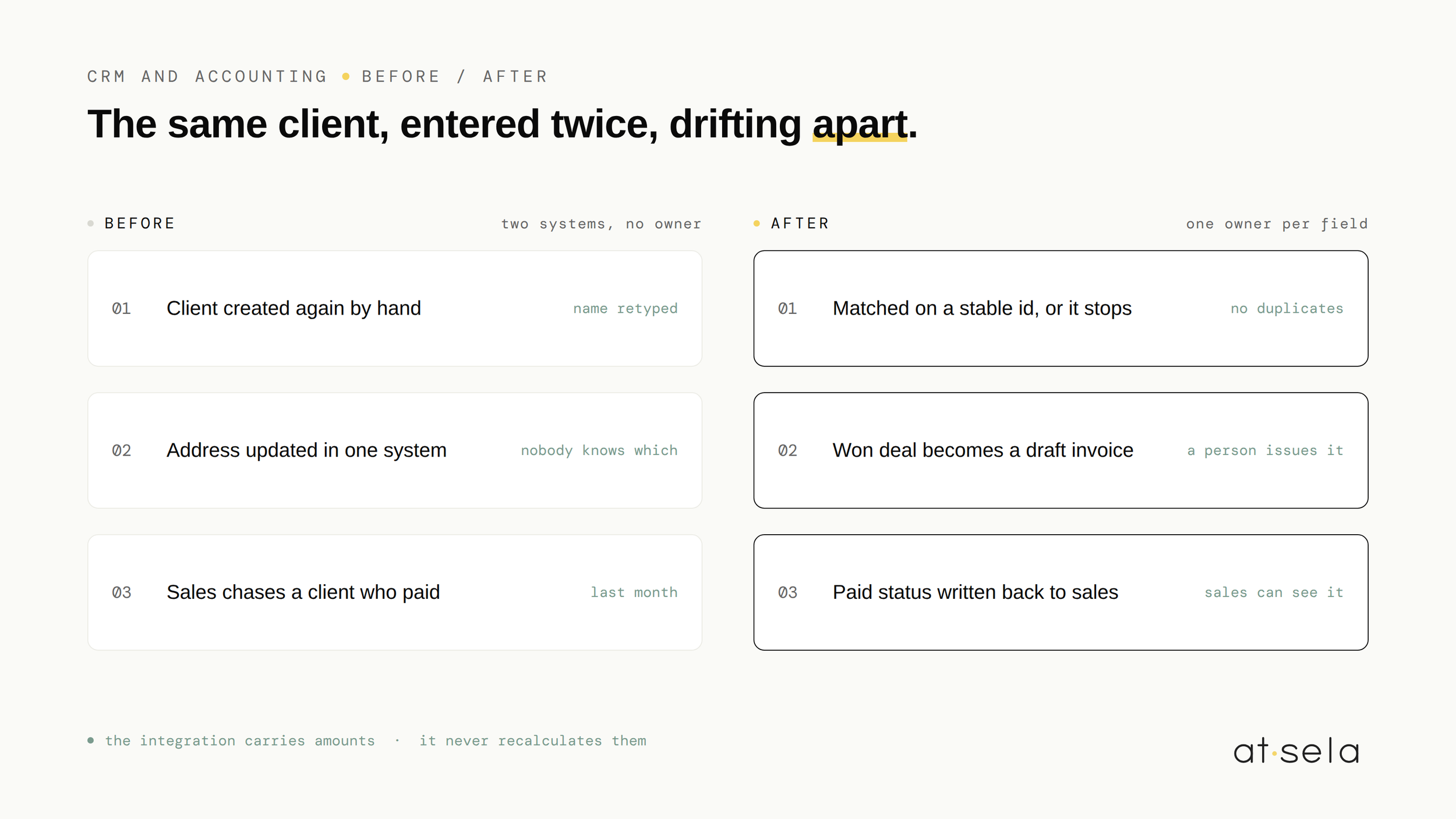
Sales closes a deal. Someone opens the accounting tool, creates the client again, retypes the name, the address, the VAT number, and produces the invoice. Two weeks later the address changes. It gets updated in one of the two systems. Nobody remembers which.
From there everything is slightly wrong in a way that costs a little every week. Invoices go to a former address. A client appears twice in the accounting tool with two spellings. Sales does not know who has paid, so they either ask accounting or, worse, chase a client who settled a month ago. We priced this exact pattern in what re-typing data actually costs, and the retyping is never the expensive part. The disagreement is.
02What actually needs to move, and what does not
The instinct is to sync everything. It is the wrong instinct, and it is the reason most of these projects become unmaintainable. Three things need to cross, in one direction each.
Everything else stays where it is. Pipeline stages, call notes and forecasts have no business in an accounting tool. Ledger entries, tax codes and reconciliations have no business in a CRM. A field that nobody reads on the other side is a field that will silently break and nobody will notice for months.
03One system has to be right
Answer it field by field, write it down, and do not build until it is written. In most small companies the CRM owns the commercial identity and the accounting tool owns everything financial. What matters is not which answer you pick, it is that there is one, and that it never depends on who happened to edit last.
This is also where two-way sync earns its bad reputation. Two systems both allowed to overwrite the same field will eventually fight over it, and the loop that follows is genuinely hard to unwind. One owner per field, one direction per field. It is less clever and it survives.
04What the build looks like
A deal moves to won in the CRM. The scenario checks whether that client already exists on the accounting side, matching on a stable identifier rather than the name, because names are typed by humans and humans are inconsistent. If it does not exist, it is created. Then the invoice draft is written with the deal lines, and the accounting reference is stored back on the deal so the two records know about each other from that point on.
A second, slower scenario runs on a schedule and reads back what has been paid, updating the deal. Nothing is sent to a client automatically and no invoice is validated by a machine. A person still opens the draft, checks it and issues it. It is the same three-part shape as every scenario we build, described in ten Make scenarios for small businesses.
05Four things that break, and how to plan for them
Matching on company name creates a second client the first time someone writes it with a different suffix. Match on a stable identifier, and when there is none, make the scenario stop and ask rather than guess.
A deal reopened and closed again should not produce a second invoice. Storing the accounting reference on the deal is what makes the scenario able to tell the difference.
If the client is created and the invoice fails, you are left with an orphan. Decide in advance what happens: create the client first, retry the invoice, and alert a human if the retry fails. Silence is the failure mode that costs the most.
Do not let the integration recalculate anything. It carries amounts across, it does not compute them. Totals that have to add up belong to the accounting tool, which is built to be exact.
06When you should not build this
- A handful of invoices a month. Under roughly ten, retyping is faster than describing the mapping precisely enough for a machine, and it will stay faster for a year.
- Your CRM data is not clean. Connecting a messy CRM to accounting does not clean it, it propagates it, and it propagates it into the system your accountant reads. Clean first.
- A native integration already exists. Many CRM and accounting pairs ship one. It is usually more limited, and usually good enough. Check before paying for a custom build.
- Nobody owns the process. If no one can say who is responsible for client data, an integration will just make the ambiguity faster.
If you are not sure this is the connection worth starting with, the arithmetic takes ten minutes and it is in the 10-minute self-audit. And whatever gets built, it is yours: accounts in your name, the field ownership documented, the scenario named and commented so your team can read it. That is how we work.
Common questions, honest answers.
How do you connect a CRM to an accounting tool +
Three things cross, each in one direction. Client identity goes from the CRM to accounting when a client is created, the won deal becomes an invoice draft, and the payment status comes back to the CRM once the money lands. Everything else stays where it is. Before building, decide field by field which system wins if the two disagree.
Should CRM and accounting sync in both directions +
Not on the same field. Two systems allowed to overwrite the same value will eventually fight over it, and untangling that loop is genuinely hard. One owner per field, one direction per field. Data can flow both ways overall, as long as no single field travels in both.
What usually breaks in a CRM accounting integration +
Four things: duplicate clients created because the match was on the company name instead of a stable identifier, the same event firing twice and producing two invoices, half-written records when the second step fails, and rounding or VAT errors when the integration recalculates amounts instead of carrying them across. All four are avoidable if they are planned for before the build.
Curious if we can help
Book your free 30-minute AI scan. We'll map where your team actually loses time, and tell you honestly what's worth automating. And what isn't.
FREE AI SCAN